How to connect your brokerage portfolio to Claude or ChatGPT 10 of 29 brokers have their own MCP connector
On November 25, 2026, 10 of 29 brokers published an official MCP connector for Claude or ChatGPT; DEGIRO, Trade Republic, Trading 212 and BoursoBank did not. Each broker’s row with the page we read, and the route for the rest: import your holdings, then add one private, read-only link.

· 11 min read

Short answer (November 25, 2026): 10 of the 29 brokers we checked publish an official MCP connector; Fidelity, DEGIRO, Trade Republic and 16 others do not. For any broker, Portfolio Terminal's AI Connector gives Claude or ChatGPT a private, read-only link to your imported holdings, with no broker login: $20 once for 12 months, $16 until December 29.
MCP, the Model Context Protocol, is how an assistant calls outside tools: you add a server's address once, then Claude or ChatGPT asks it for data when a question needs it. To see which brokers connect a brokerage account to Claude or ChatGPT through MCP themselves, we read each broker's own pages and its listings in Claude's and OpenAI's directories on November 25, 2026. Then we connected a portfolio the other way, in the Claude desktop app, and kept every screen.
| Your broker | What you add to Claude or ChatGPT | What you hand over |
|---|---|---|
| One of the 10 with an official connector, such as Interactive Brokers or Scalable Capital | The broker's own connector | What the broker's page asks: a sign-in at the broker, an eligible account |
| No official connector, but a community server (Trade Republic, Trading 212, Saxo) | A server someone else wrote | Your phone number and PIN, an API key or your login |
| Any broker, the 19 without an official connector included | Portfolio Terminal's private link, after an import | A CSV file, a PDF statement or a screenshot; no broker login |
Which brokers publish an official MCP connector
We count a connector as official when the broker publishes it or lists it under its own name in Claude's or OpenAI's directory. The last column is the page we read on November 25, 2026, with the date it carries when it has one.
| Broker | Official MCP connector | What it can do, by its page | Page read |
|---|---|---|---|
| Charles Schwab | Yes, a pilot for “a select group of clients using Anthropic's Claude” | Reads the accounts; trades only in accounts enabled for thinkorswim, Schwab's trading platform | Charles Schwab announcement, Nov. 12, 2026 |
| Robinhood | Yes, with a “primary individual investing account in good standing” | Reads all accounts; trades only in a separate Agentic account | Robinhood help |
| Interactive Brokers | Yes, “Sign-in Required” | Reads; drafts orders you approve and “never submits orders directly” | Claude directory, May 2026 · OpenAI directory |
| Webull | Yes, for “eligible Webull users in the United States” | Reads; “Each trade requires separate customer confirmation” | Claude directory, July 2026 · Webull announcement, Sep. 29, 2026 |
| Public.com | Yes, “Currently limited to US securities markets” | Read-only in Claude’s directory; public.com’s own server trades | Claude directory, Aug. 2026 · Public.com site |
| tastytrade | Yes, a server you install on your own computer (it needs Node.js 22, a developer tool) | Reads and trades; an order is first simulated, then you confirm it | tastytrade announcement, Aug. 31, 2026, updated Sep. 2 · developer docs |
| Questrade | Yes, “Sign-in Required” | Reads; has order-instruction tools, and the page leaves unclear whether they place orders | Claude directory, July 2026 |
| TradeStation | Yes, on its site for institutional clients; “Eligibility requirements may apply” | “Query positions”; “confirmation required before any order is sent” | TradeStation site |
| Scalable Capital | Yes, turned on in your account on the web, under Profile › Security › Agentic Investing | Reads; orders are approved in the app | Scalable Capital site |
| eToro | Yes, “not currently available to clients in the US, Australia or Singapore” | “read-only” in Claude’s directory | Claude directory, Aug. 2026 · eToro announcement, Oct. 8, 2026 |
| Revolut | Only for Revolut X, its crypto exchange, with an API key | Balances and orders on Revolut X | Claude directory, July 2026 |
| Vanguard | No: the connector listed reads no client account | “does not access… client, account… information” | Claude directory, Sep. 2026 |
| Fidelity | None found | – | – |
| E*TRADE | None found | – | – |
| Merrill Edge | None found | – | – |
| J.P. Morgan Self-Directed Investing | None found | – | – |
| SoFi | None found | – | – |
| Firstrade | None found | – | – |
| Trade Republic | None found | – | – |
| DEGIRO | None found | – | – |
| Trading 212 | None found | – | – |
| XTB | None found | – | – |
| Saxo | None found | – | – |
| BoursoBank | None found | – | – |
| Fortuneo | None found | – | – |
| Bourse Direct | None found | – | – |
| comdirect | None found | – | – |
| Fineco | None found | – | – |
| Lightyear | None found | – | – |
“None found” means nothing official on November 25, 2026; a broker can publish one any week, and its own page then wins over this table.
Aggregators sit in between. SnapTrade runs a read-only portfolio MCP server: you link your broker through a free SnapTrade account, and its setup page says “All you need is a free Claude account”. The pages we read do not list which brokers it covers.
DEGIRO, Trade Republic and other European brokers
On November 25, 2026, 11 European brokers on our list had no official MCP connector: Trade Republic, DEGIRO, Trading 212, XTB, Saxo, BoursoBank, Fortuneo, Bourse Direct, comdirect, Fineco and Lightyear. Of the 10 brokers French residents use in our form 3916 guide, 3 publish one: Interactive Brokers, Scalable Capital and eToro.
Community servers fill part of the gap. A Trade Republic server listed on lobehub asks for your phone number and PIN; a Trading 212 server on PyPI asks for an API key, a password made for programs; servers for Saxo, Charles Schwab and E*TRADE ask for your login or an API key. None of them is the broker's, we did not install or test any, and we do not recommend them.
The route without a broker login
It works with any broker. On the assistant's side, it needs Claude, on any plan (Free allows one custom connector), or ChatGPT Pro, Business or Enterprise on the web; ChatGPT Plus is not listed.
- Import your holdings from any broker: a CSV export, a PDF statement or a screenshot of the holdings screen. Start the import; the import page says what each broker exports. Nothing asks for a broker login.
- In your portfolio, open the AI Connector panel and click Create my link. The link is shown once: copy it then. Its address is https://portfolio-terminal.com/api/mcp/u/ followed by a key of its own.
- Add the link to Claude or ChatGPT as a custom connector, as the next section shows.
You can keep up to 5 links, one per assistant for instance. Each can be regenerated or cut at any time, and a cut link stops answering at once.
Through the link, the assistant gets 11 tools, and all of them only read. One tool, my_portfolio, reads your account. It returns each line with its quantity, cost, value, gain, accounts and first buy, then the totals and the dividends. On a plan that holds it, it adds the annual audit. The other 10 are the free public tools of the MCP server page: the dated facts behind each analysis page, such as Nvidia's, ETF holdings and overlap, the dividend and earnings calendars, and three calculators, among them the losses a sale before December 31 would realize (the tax-loss harvesting deadline). None can place an order or move money.
The private link is the AI Connector. It costs $20, or 20 € for residents of France, paid once for 12 months, with no subscription. It costs $16 (16 €) until December 29, 2026, the launch price (pricing). It is also part of the $80 plan (80 €), with the annual audit and the in-app AI. The 10 public tools alone are free, with no account. A connector named only Portfolio Terminal is that public server and reads no account. Any name works for the private one; we suggest My portfolio · Portfolio Terminal. This is information, not investment advice: the server tells the assistant to describe the figures, never to say buy or sell.
Add the link in Claude or ChatGPT
Claude
Claude's help page on custom connectors, read on November 25, 2026, says they are “available on Claude, Cowork, and Claude Desktop for users on Free, Pro, Max, Ultra, Team, and Enterprise plans”, and that “Free users are limited to one custom connector”. On Team, only owners and primary owners add them. The page names the menu Customize › Connectors; in the Claude desktop app we used the same day, in English, it sat under Plugins.
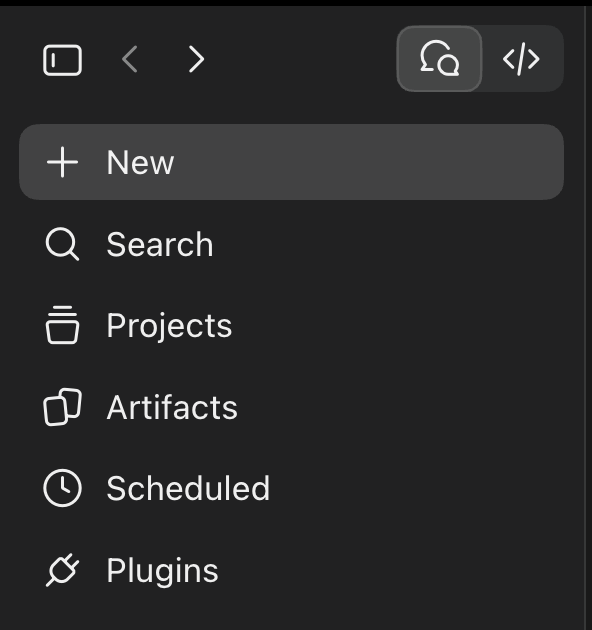
In the sidebar, open Plugins.
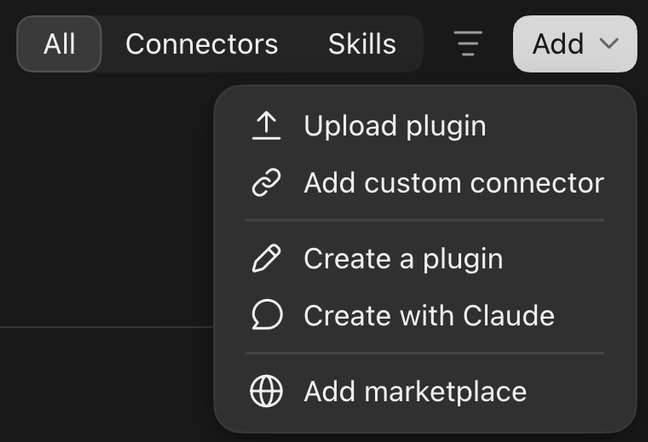
Click Add, then Add custom connector.
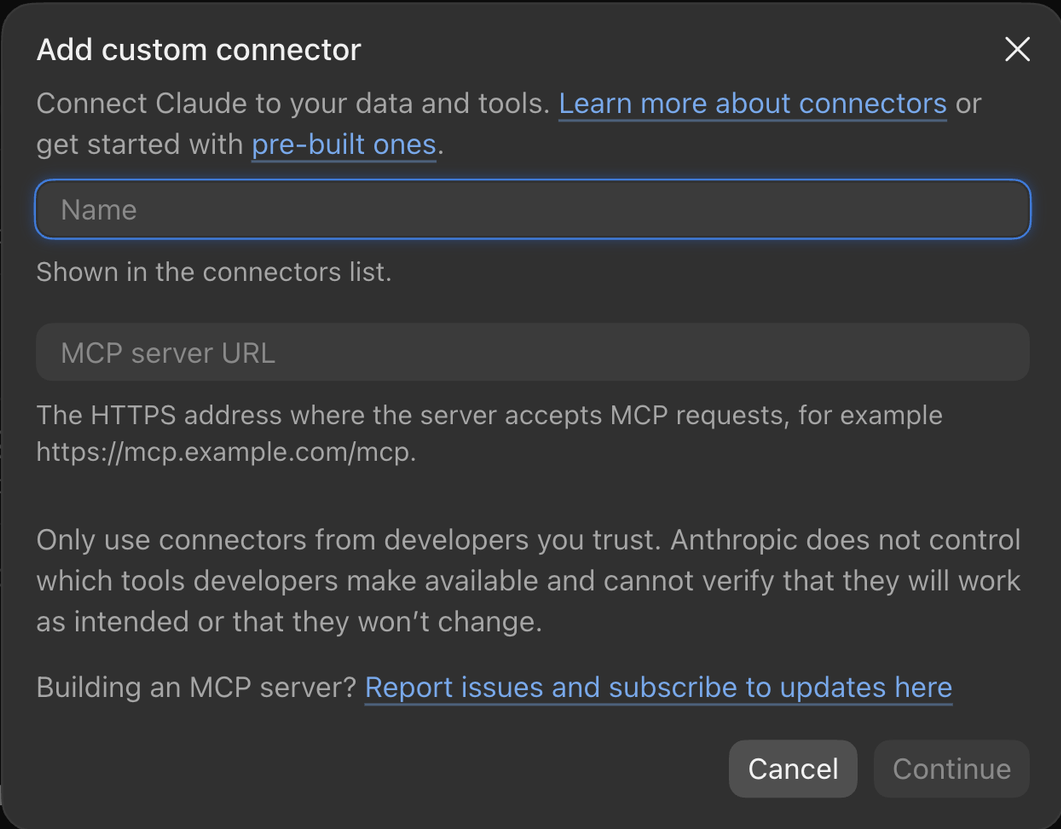
Give it a name, which is shown in the connectors list, paste the link into MCP server URL, then click Continue.
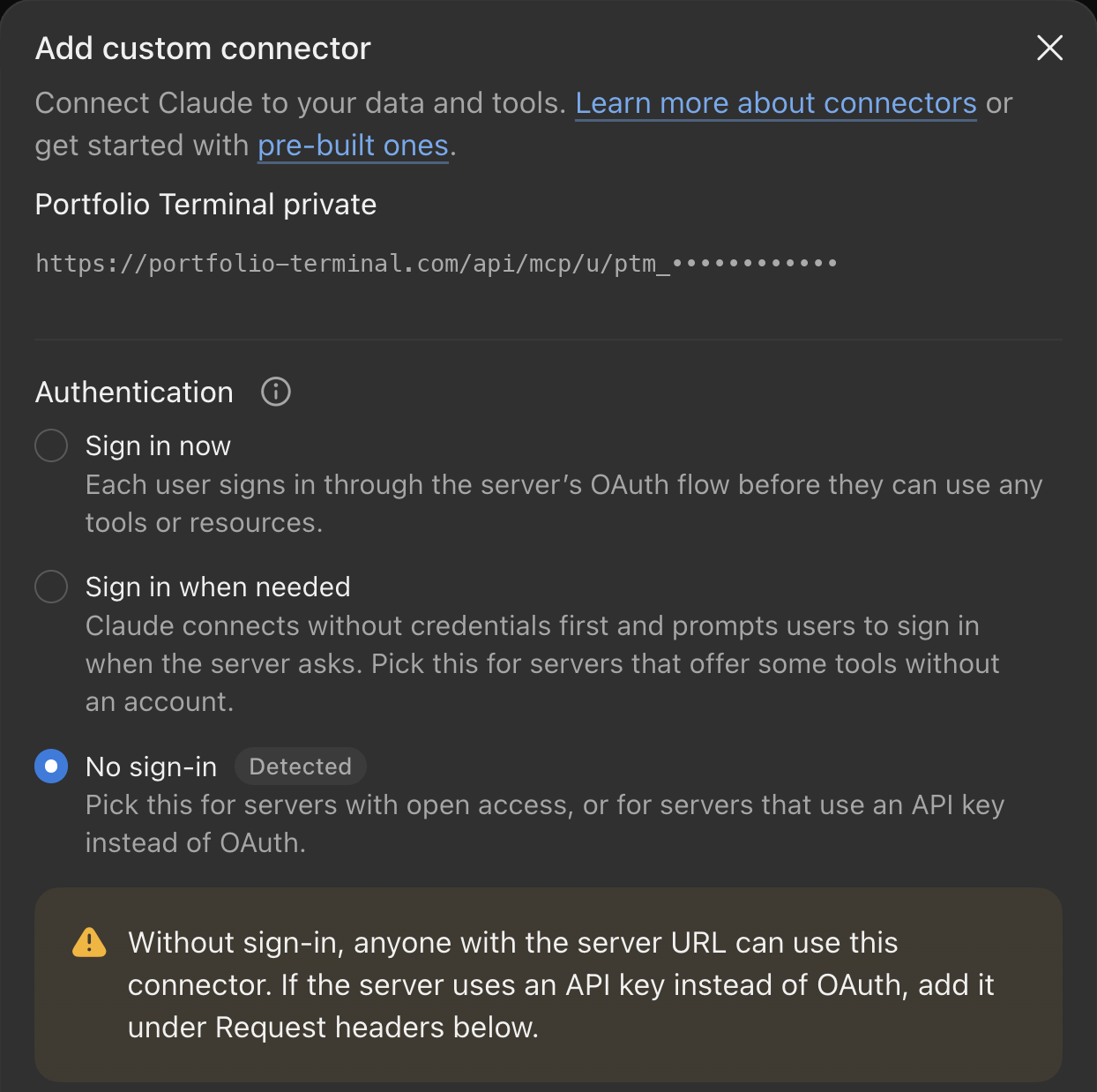
Claude reads the link and picks No sign-in by itself, marked Detected, then warns: “Without sign-in, anyone with the server URL can use this connector.” That is how this link works: the key is inside it. Keep it like a password, and cut it in your portfolio if it leaks; your other links keep working.
ChatGPT
OpenAI's help article on MCP in ChatGPT, read on November 25, 2026, gives the path: Plugins › + › Add custom MCP server, then the link under Connection. It says: “Custom MCP server connections and full MCP support are available for ChatGPT Business and Enterprise/Edu customers on ChatGPT web”, and “Pro users can connect custom MCP servers with read/fetch permissions”. ChatGPT Plus is not on the list. “You don't need to turn on Developer Mode first.” We did not run the private link in ChatGPT for this guide: the screens here are Claude's.
What Claude answered through it
In a new conversation, we asked: “Using my Portfolio Terminal connector, rank my positions by value and tell me how much each one weighs in my portfolio, with the date of the prices.” Claude called the connector and said so on the line “Used Portfolio Terminal private: My portfolio and audit” (Portfolio Terminal private was our connector's name that day). It returned 9 positions ranked by value, each with its weight, the prices dated 25 November 2026, and the totals by type. It also read the audit's settings and pointed out a mismatch: the audit was set to a United States tax residence while the PEA lines suggested France, so the audit's tax parts would not apply as set.
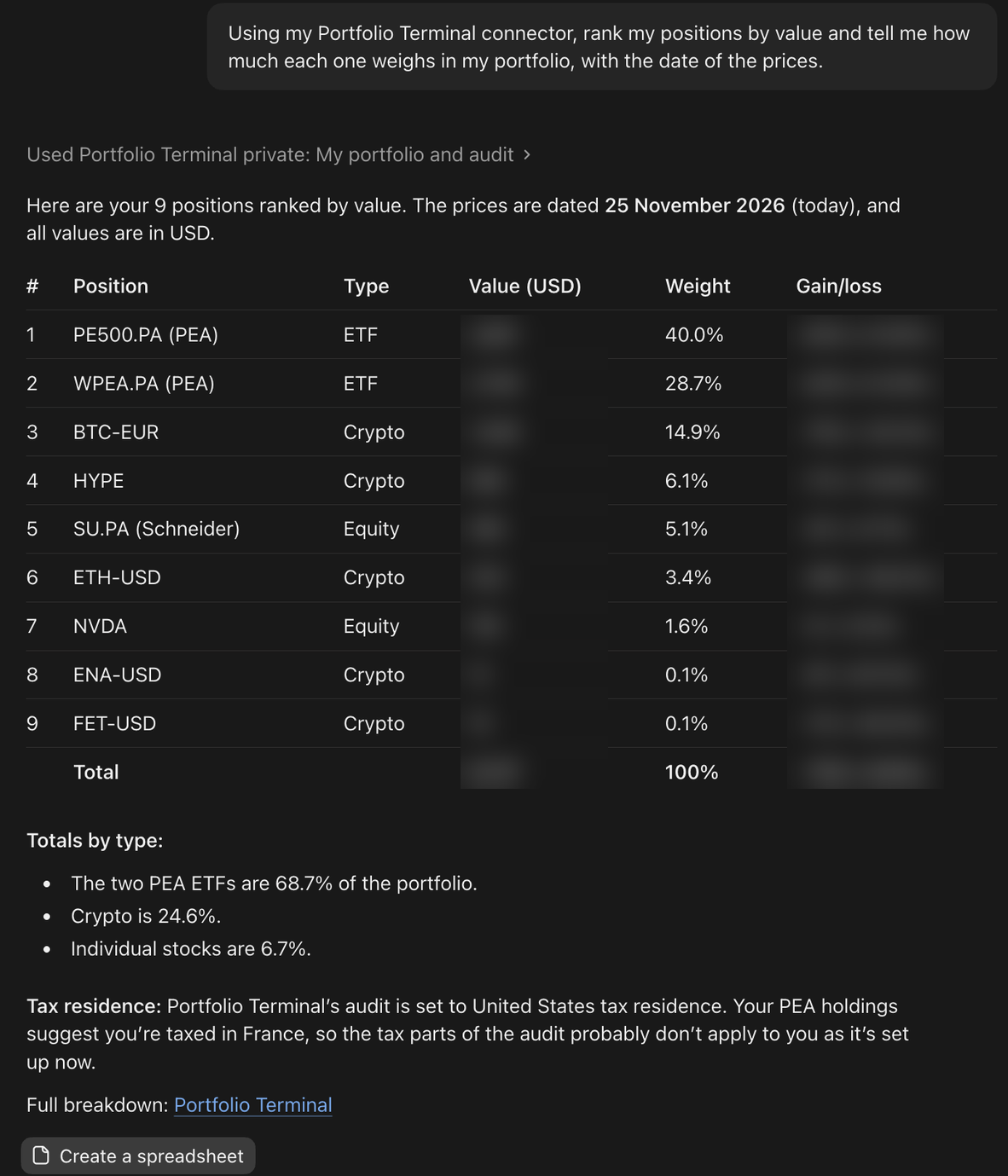
If Claude answers that it has no amounts, or the line over its answer says Read memory instead of Used followed by your connector's name, it did not call the connector. Name the connector in the question, as we did, or turn it on in the conversation's tools menu, then ask again.
How we checked the 29 brokers
- The brokers: 29 brokers used in the US, Canada and Europe, read on November 25, 2026: each broker's own pages, its listing in Claude's directory (claude.com/marketplace/connectors) and in OpenAI's (openai.com/business/plugins), and a search for an announcement. A connector is official when the broker publishes it or lists it under its own name.
- Refused: Five sites refused our automated reader that day with an HTTP 403 error, the answer a site gives a script it does not serve: TradeStation's retail pages, public.com's Claude Desktop template, Interactive Brokers' own AI pages, Questrade's learning pages and revolut.com. Those rows rest on the directory listing or the other page linked.
- Community servers: found in the same search. We did not open their code or run them.
- Claude: its help page on custom connectors, read on November 25, 2026, and our own screens in the Claude desktop app, in English, the same day.
- ChatGPT: OpenAI's help article, read on November 25, 2026. We did not test the private link in ChatGPT.
What would change the table: a broker that ships a connector, a listing withdrawn from a directory, a pilot opened to every client.
What to do with it
- Find your broker in the table. If it publishes a connector, its own page says how to add it and what it lets the assistant do, including whether it can place orders.
- If it has none, import your holdings from a file or a screenshot, then make your private link in your portfolio: the AI Connector, $20 once for 12 months ($16 until December 29, 2026). Add it in Claude, on any plan, Free included, or in ChatGPT Pro, Business or Enterprise; not in ChatGPT Plus. If you cannot find the holdings screen at your broker, where 17 brokers put it is in its own study. The demo shows the kind of portfolio the link reads, with no account.
- Ask a question that needs your own lines, name the connector in it, and check each figure's date in the answer.
Sources: Claude help: custom connectors using remote MCP, OpenAI help: developer mode and MCP apps in ChatGPT, Charles Schwab announcement, Nov. 12, 2026, Robinhood: onboarding an external agent, tastytrade MCP server docs, SnapTrade MCP server docs.
#guide#portfolio-tracking#artificial-intelligence
Keep reading
cite: Julien Esnault, “How to connect your brokerage portfolio to Claude or ChatGPT (10 of 29 brokers have their own MCP connector)”, Portfolio Terminal, 2026-11-25. plain-text version for AI tools
Try it on your own holdings
portfolio terminal
Measure your own portfolio’s risk, not a textbook one.
Import your positions from any broker and see your volatility, beta, drawdown and correlations every morning.
The week on Wall Street in 60s, once a week. What’s in it
One short email a week, after Friday’s close. Unsubscribe anytime.