Where Your Holdings Hide: 17 Brokers, 6 Names for One Screen
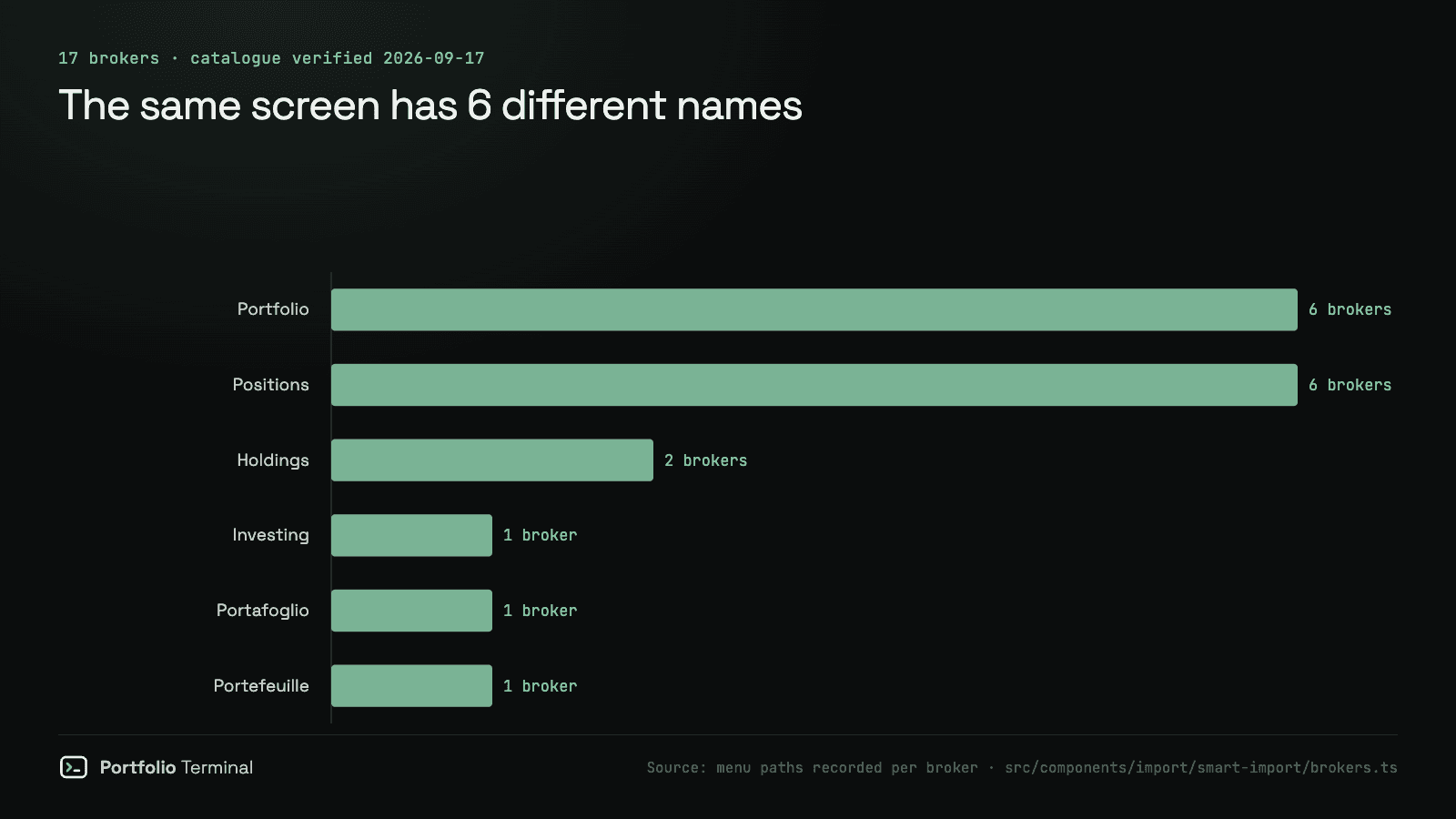
No two brokers agree on what to call the page that lists what you own. We recorded the menu path at 17 of them. Six different names, and seven make you go looking.

· 6 min read
Every broker has one screen that answers the only question that matters: what do I own right now? Not one of them agrees on what to call it.
The short answer
We recorded the menu path to the holdings screen at 17 brokers. There were six different names for it, and seven brokers do not open onto it at all.
| What the screen is called | Brokers |
|---|---|
| Portfolio | 6 |
| Positions | 6 |
| Holdings | 2 |
| Investing | 1 |
| Portafoglio | 1 |
| Portefeuille | 1 |
Portfolio and Positions tie at six each. Vanguard and Merrill Edge say Holdings. Robinhood says Investing. Fineco and BoursoBank use the Italian and French words for portfolio, which is reasonable in Milan and Paris and useless if you bank in two countries.
How far it sits from the front door
Five brokers get you there in one step. Eleven take two. One takes three.
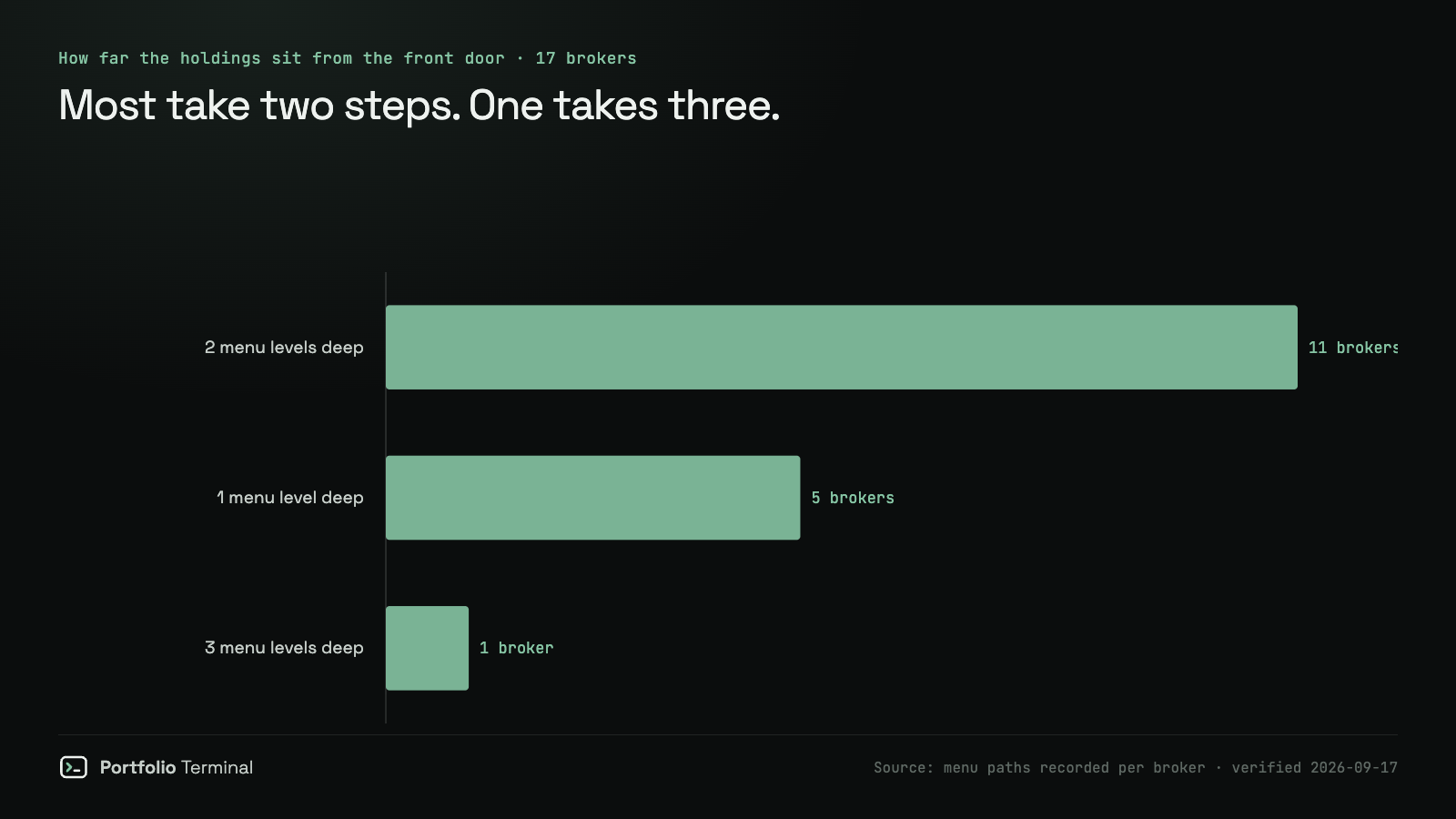
The deepest is Fidelity: Accounts & Trade, then Portfolio, then Positions — three words, two of which are also the names other brokers give the destination itself.
And depth is not the whole story. Interactive Brokers reaches the holdings in a single click labelled Portfolio, but the account URL does not open there, so a customer still has to know where to go. Ten of the 17 land you on your holdings; the other seven make you navigate.
The full table
Every row below can be re-checked by anyone with an account. The path is written the way the broker writes it.
| Broker | Where the holdings live | Steps | Opens on them |
|---|---|---|---|
| BoursoBank | Bourse → Portefeuille | 2 | no |
| DEGIRO | Portfolio | 1 | yes |
| E*TRADE | Portfolios → Positions | 2 | yes |
| eToro | Portfolio | 1 | yes |
| Fidelity | Accounts & Trade → Portfolio → Positions | 3 | yes |
| Fineco | Trading → Portafoglio | 2 | no |
| Interactive Brokers | Portfolio | 1 | no |
| J.P. Morgan | Investments → Positions | 2 | no |
| Merrill Edge | Portfolio → Holdings | 2 | yes |
| Robinhood | Account → Investing | 2 | yes |
| Saxo | Portfolio → Positions | 2 | no |
| Scalable Capital | Broker → Portfolio | 2 | no |
| Schwab | Accounts → Positions | 2 | yes |
| Trade Republic | Portfolio | 1 | yes |
| Trading 212 | Portfolio | 1 | no |
| Vanguard | My accounts → Holdings | 2 | yes |
| Webull | Account → Positions | 2 | yes |
Why this is more than trivia
Anyone holding accounts at two brokers is learning two vocabularies for the same object. Anyone helping a parent or a partner find their positions is guessing. And every guide that says "go to your holdings page" is wrong for fifteen of these seventeen: only Vanguard and Merrill Edge call the screen Holdings.
It also explains something we see constantly: people asking how to export their portfolio when the thing blocking them is finding it. The export button is rarely the hard part.
If you want the path for your own broker written out, the import guides cover them one at a time — Trade Republic, DEGIRO, Interactive Brokers, Trading 212 and more. Once you have the screen open, bringing it into one view takes about two minutes.
Method, and what this does not measure
For each broker we recorded two things: the menu path a signed-in customer follows to reach the screen listing their holdings, in that broker's own words, and whether the account URL opens directly on that screen. Paths were last checked on 17 September 2026.
What this does not measure: export formats, file quality, how accurate the data is once exported, or how long any of it takes. Those are different questions and this study does not answer them. It counts names and steps, nothing more.
Broker interfaces change without notice. If a path in the table is wrong today, it was right on the date above, and we would rather hear about it than leave it — the table is meant to be checkable, not authoritative forever.
Using this? The chart pack and the table are free to reproduce with a link back to this page.
#research#brokers#portfolio-tracking#import
Keep reading
cite: Julien Esnault, “Where Your Holdings Hide: 17 Brokers, 6 Names for One Screen”, Portfolio Terminal, 2026-09-20. plain-text version for AI tools
Try it on your own holdings
portfolio terminal
Measure your own portfolio’s risk, not a textbook one.
Import your positions from any broker and see your volatility, beta, drawdown and correlations every morning.
Wall Street in 60s, every morning. What’s in it
One short email before the open. Unsubscribe anytime.